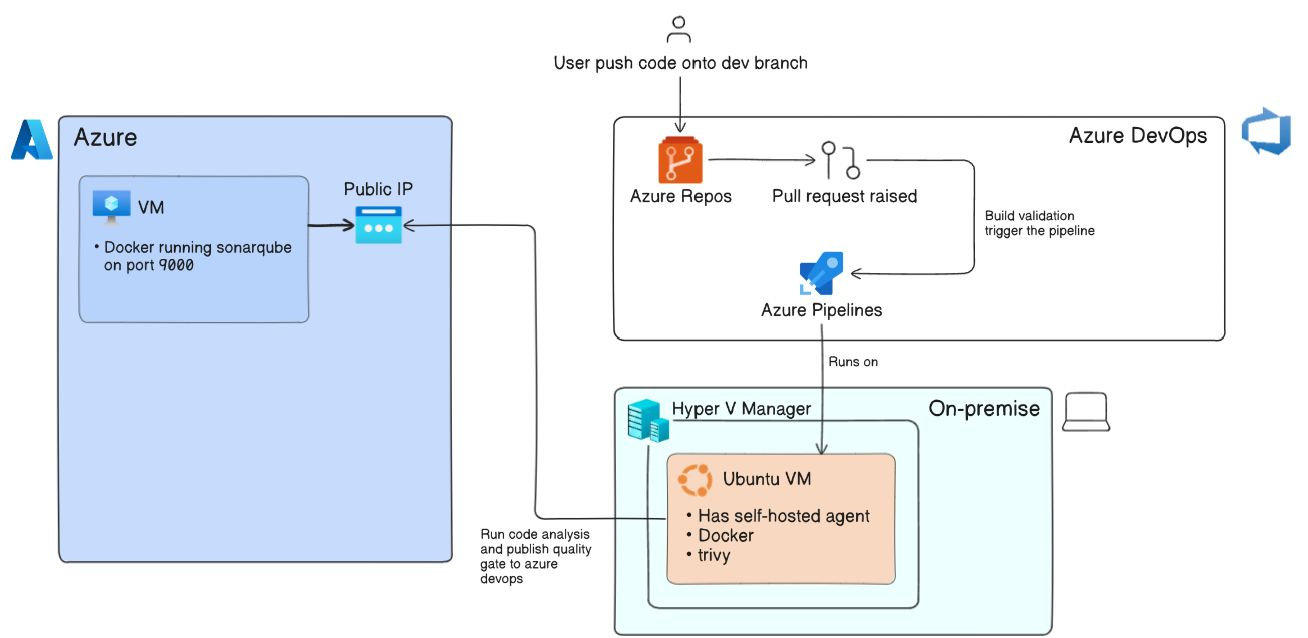
This lab shows the end-to-end project implementation of DevSecOps that I did for an simple Node.js API and a React client used for a user management, by using various tools, services and concepts. GitHub Repo
0) Tools and Services Used
- Azure DevOps
- Docker
- Sonarqube
- Whitesource MendBolt
- NodeJS, MySQL, nginx
- Trivy(implemented for filesystem and images, but filesystem one is commented out)
- Hyper-V (For Ubuntu VM)
1) Repo Structure and DockerFiles
api/is the backend of the application which runs on port 5000, connects to MySQL database running on 3306.client/is the frontend of the application which runs on port 3000.- Above two folders has their own multi-stage dockerfile which are used in
docker-compose.ymlfile. azure-pipelines.ymlis Azure DevOps(ADO) YAML pipeline.README.mdis documentation you're reading now.images/contains images for documentation.mysql-init/containsinit.sqlfile for MySQL Server.
2) Environment, User, Branching Strategy
2.1 Environment
- Using multiple environments make the disaster recovery of the application faster and traceble.
- Some conventional environments are:
- dev: where development of aplication takes place
- qa: where bugs, issues, testing happens
- ppd: pre-production same config as production
- prod: real environment for application deployment, visible to end user
- dr: disaster recovery, incase production crash with unknown reasons
2.2 Branching
- Each environment has it's own branch in the application repo.
- New features will be made through
featurebranch and merged indevbranch, if feature is completed it then merged withqabranch. - While testing is done in qa branch, if any bugs or error came, then a short lived
bugfixbranch is created to solve the bug. - After
qa, it will be merged toppdbranch where deployment to pre-production environment takes place. - Finally merge into
mainbranch for production deployment, if any bugs or error came, then a short livedhotfixbranch is created to solve the bug. - The
mainbranch code is also merged todrbranch.
- New features will be made through
2.3 User Management
- On a single application, a team consist of developers, reviewers, devops engineer, etc work collectively.
- But the access givem to each of the department is different for security and managibility.
- Following could be used:
- Developers: Access to repo to read or write
- Reviewer: Read access to repo, managing issues/PRs
- DevOps: Admin access to manage code and deploy both
- Readers: Read access to the application development lifecycle (For cost, auditing, etc.)
- In ADO (Azure DevOps) Project, I implemented security group for each team/department:
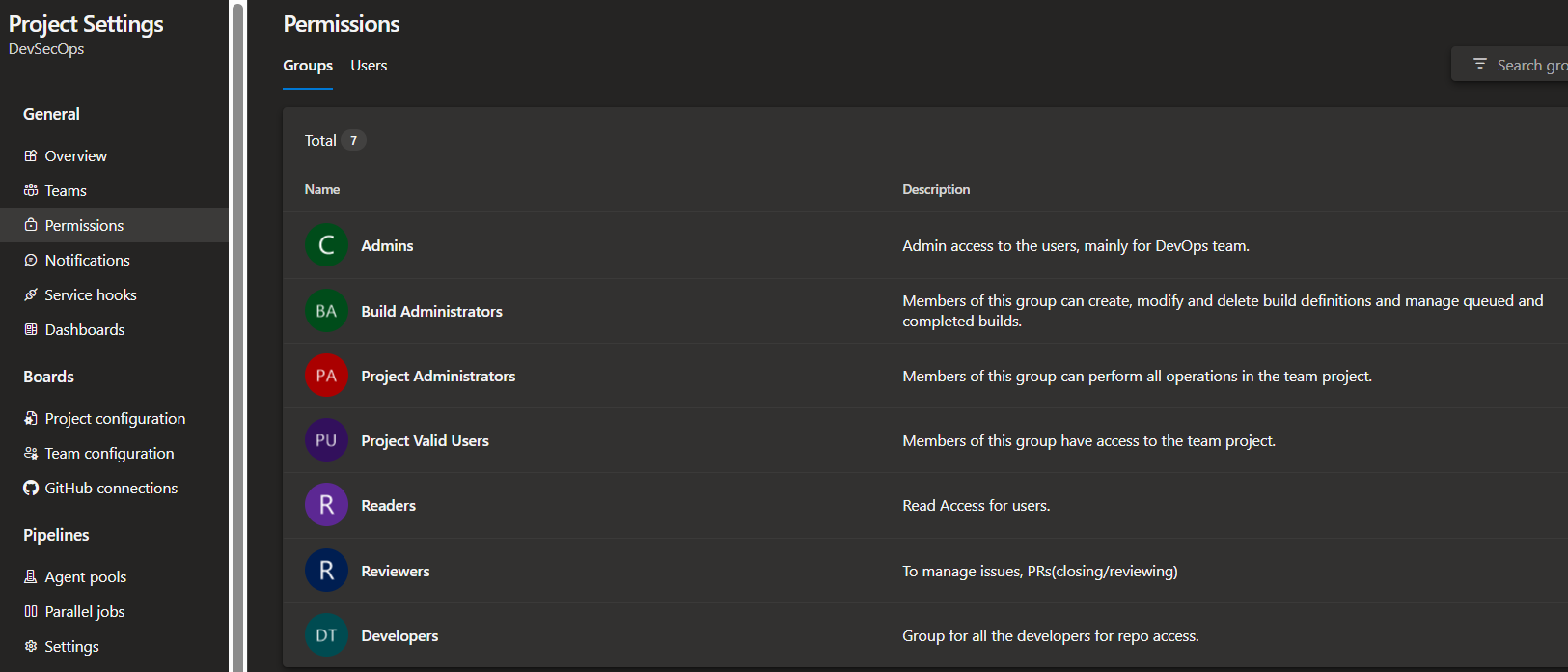 Ignore Other groups on 2nd, 3rd and 4th number, those are default created by ADO.
2.4 Branch Protection
To protect some branches for direct push or delete, we enforce some rules and policy onto branches.
For example, main branch should allow commit from PR only after a review, allowing merge into qa branch after the build generated on the PR is successful, etc.
- I setup some protection onto
mainbranch for security purposes: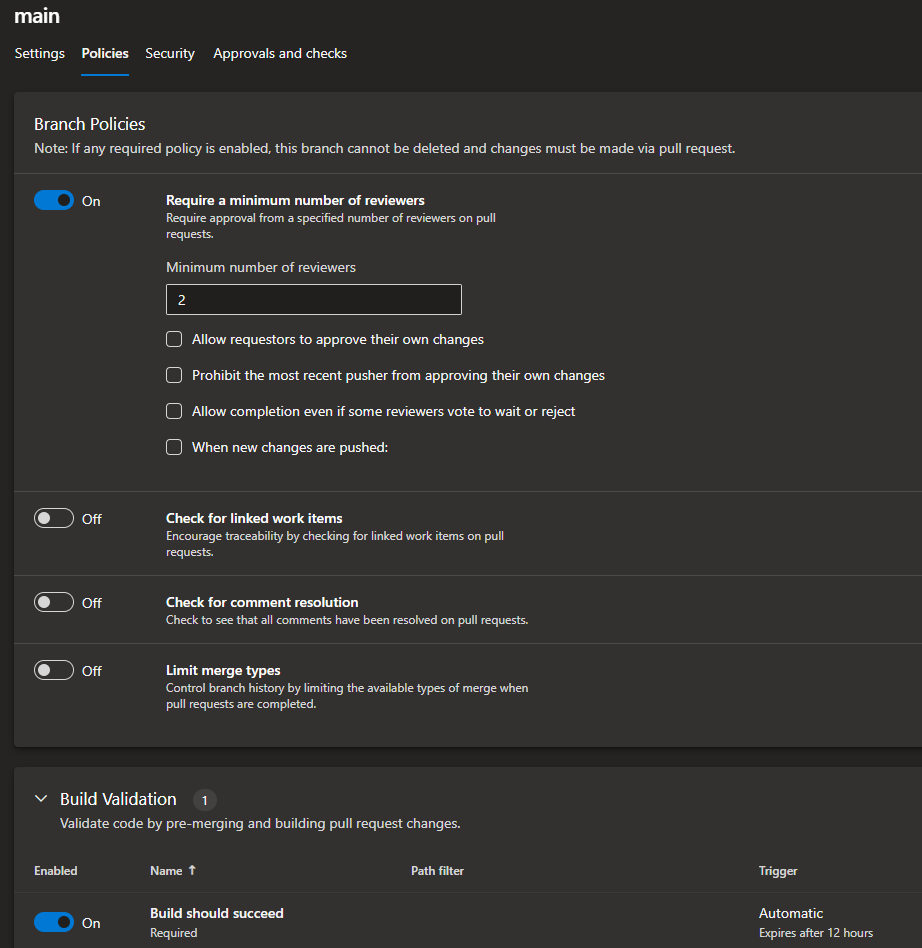
3) Continuous Integration/ Continuous Delivery
3.1 Using Self-Hosted Agents
Azure DevOps pipeline run on agents, So I'm using Self-Hosted Agent which is an Ubuntu VM running on my local windows machine's Hyper-V. I made that VM registered with Azure DevOps as an agent for pipeline.
I also have one Public Azure Virtual machine running sonarqube:lts-community on port 9000 using docker and MySQL server on port 3306. Both port are allowed in VM's network settings.
To setup MySQL, check this file.
3.2 Making pipeline
I implemented following flow for the pipeline:
- Check for compilation errors in the application code
- Use Gitleaks to check any secret spilling
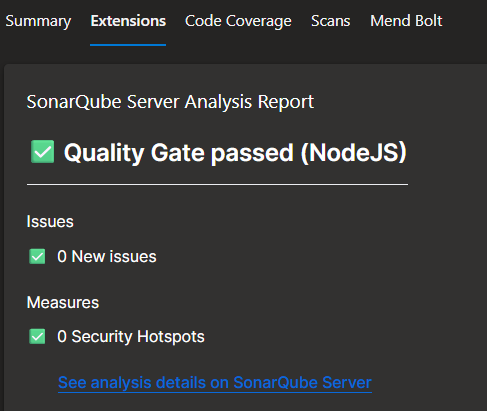
- Perform SAST using sonarqube(I configured in pipeline that if quality gate failed then it will make pipeline fail), following are the results of test run:
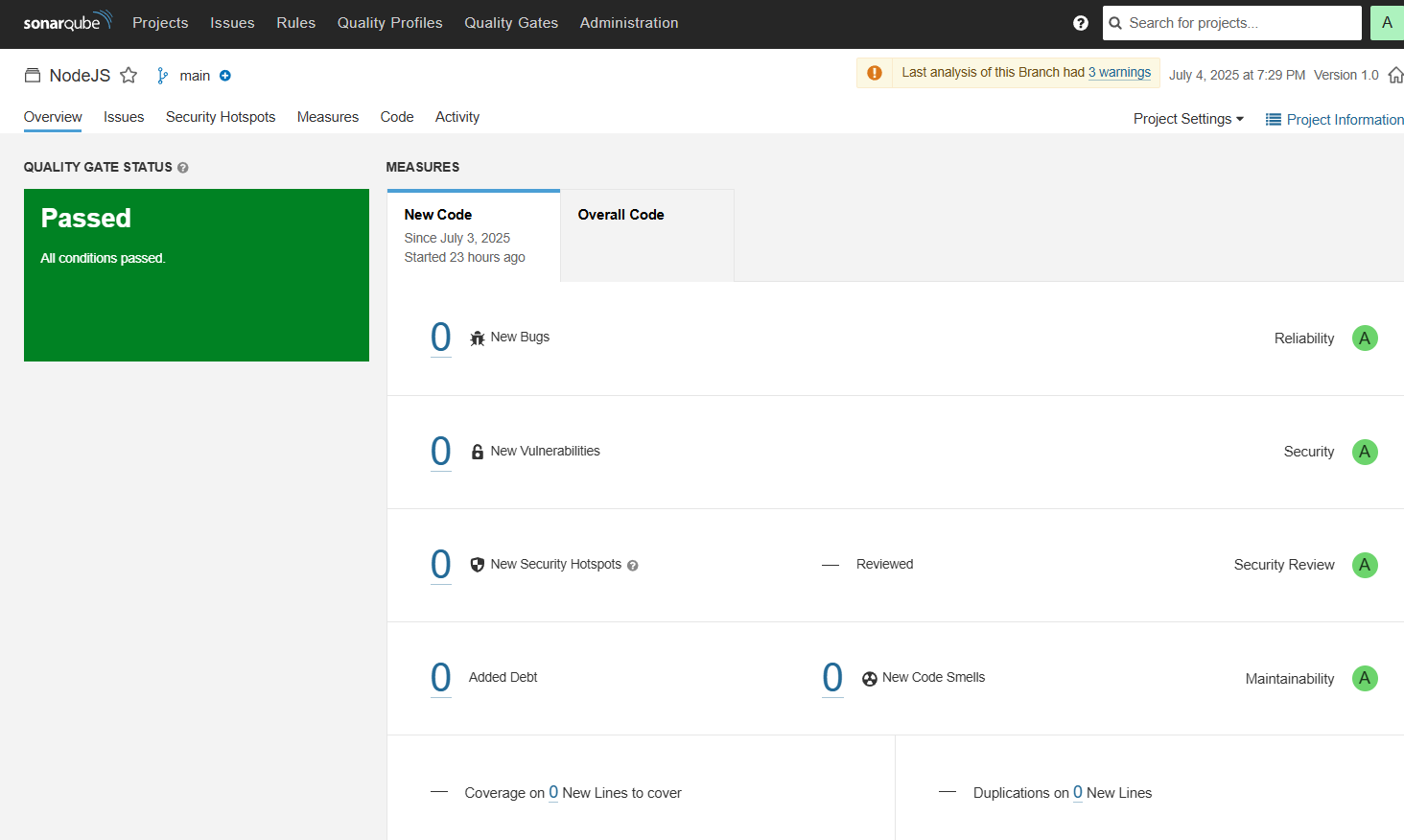
- After the analysis, a quality gate is publish at Azure DevOps Pipeline run tab:
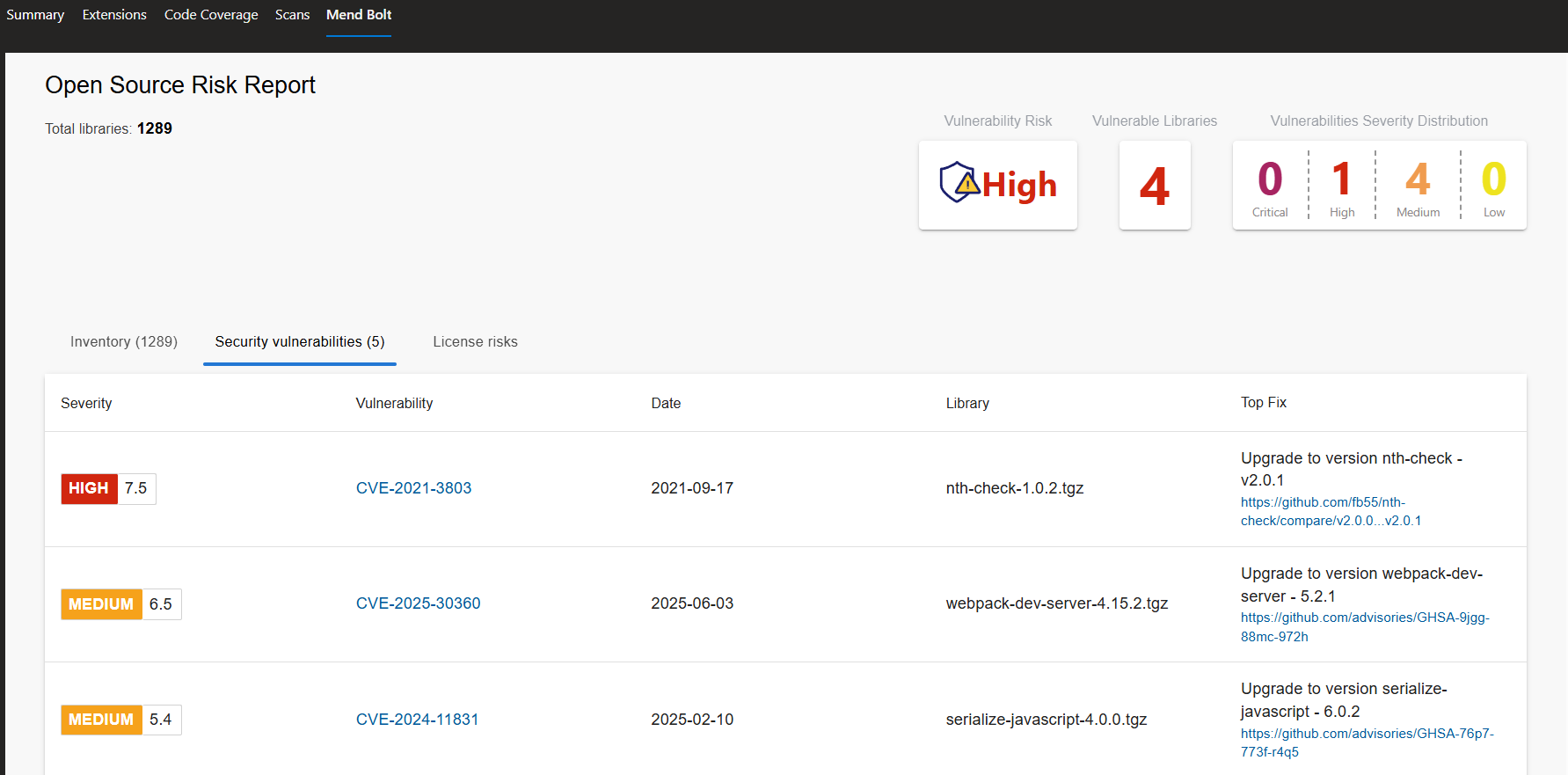
- Perform Vulnerability scan using MendBolt by Whitesource, It will check the project dependencies against a CVE database and generate a report. Following are the results on pipeline run tab:
- Build both frontend and Backend Images, Run a Trivy Scan on them and push them on to Docker Registry.
For CD, I use Docker Compose to run the application on the Agent where the pipeline ran. Now this is not the best practice for deployment. A separate Deployment pipeline should be made which pull the images from the docker registry and run them respectively on platforms like VM, Azure Web App for Containers, AKS, etc.
docker-compose.ymlfile:
version: '3.8'

    services:
      mysql:
        image: mysql:8
        container_name: mysql
        restart: always
        environment:
          MYSQL_ROOT_PASSWORD: $(MYSQL_ROOT_PASSWORD)
          MYSQL_DATABASE: $(MYSQL_DATABASE)
        volumes:
        - mysql-data:/var/lib/mysql
        - ./mysql-init:/docker-entrypoint-initdb.d
        ports:
        - "3306:3306"

      backend:
        build: ./api
        container_name: backend
        environment:
          DB_HOST: $(DB_HOST)
          DB_USER: $(DB_USER)
          DB_PASSWORD: $(DB_PASSWORD)
          DB_NAME: $(DB_NAME)
          JWT_SECRET: $(JWT_SECRET)
          RESET_ADMIN_PASS: $(RESET_ADMIN_PASS)
        depends_on:
        - mysql
        ports:
        - "5000:5000"

      frontend:
        build: ./client
        container_name: frontend
        ports:
        - "3000:80"
        depends_on:
        - backend

    volumes:
      mysql-data: